
Stop Missing Exam Deadlines. Forever.
Track every SSC, Railway, Banking, and State PSC exam in one free dashboard. Deadlines, admit cards, results — all auto-updated the moment the board announces.
Join 50,000+ serious aspirants who never open 10 browser tabs again.
Your entire exam journey. One screen.
The examkhiladi Application Tracker shows every exam's full milestone timeline — Apply Start, Apply Last, Admit Card, Exam Date, Result — with live progress and urgency alerts.
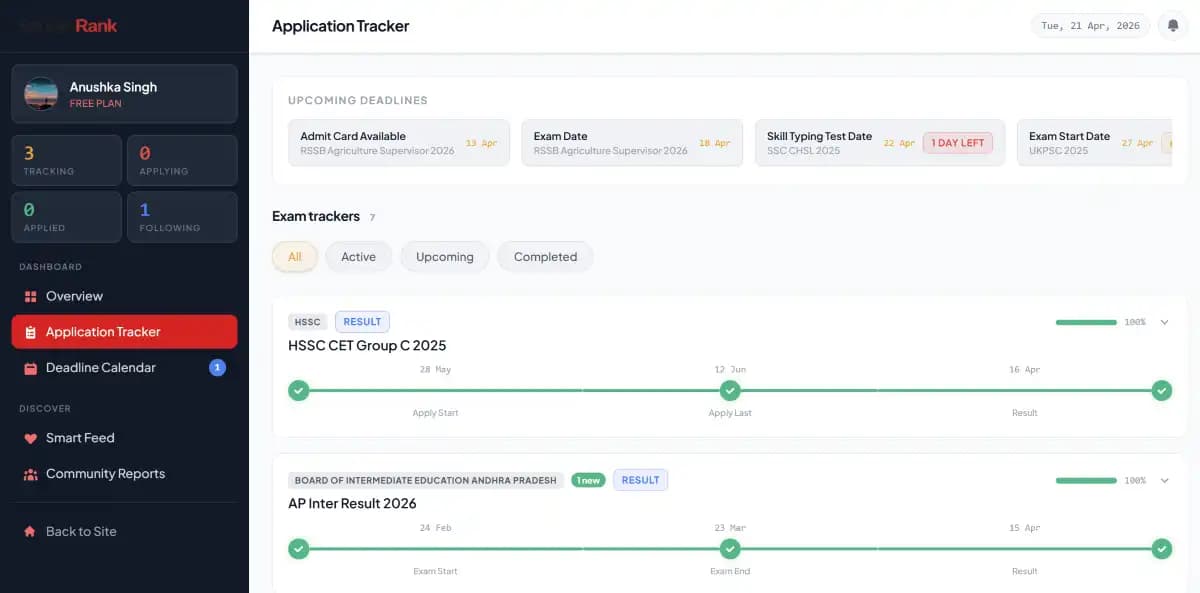
Full exam lifecycle at a glance
From application open to final result — every milestone is plotted on a visual timeline. No more guessing what comes next.
Upcoming deadlines strip
The top bar shows your most urgent deadlines across all exams, sorted by days remaining. "1 DAY LEFT" alerts mean you never cut it close again.
Filter by stage instantly
Switch between All, Active, Upcoming, and Completed to focus on what matters right now — whether that's applying or waiting for results.
Command centre for every serious aspirant.
The examkhiladi Overview gives you tracked exams, upcoming deadlines, and application status — all without opening a single official website.
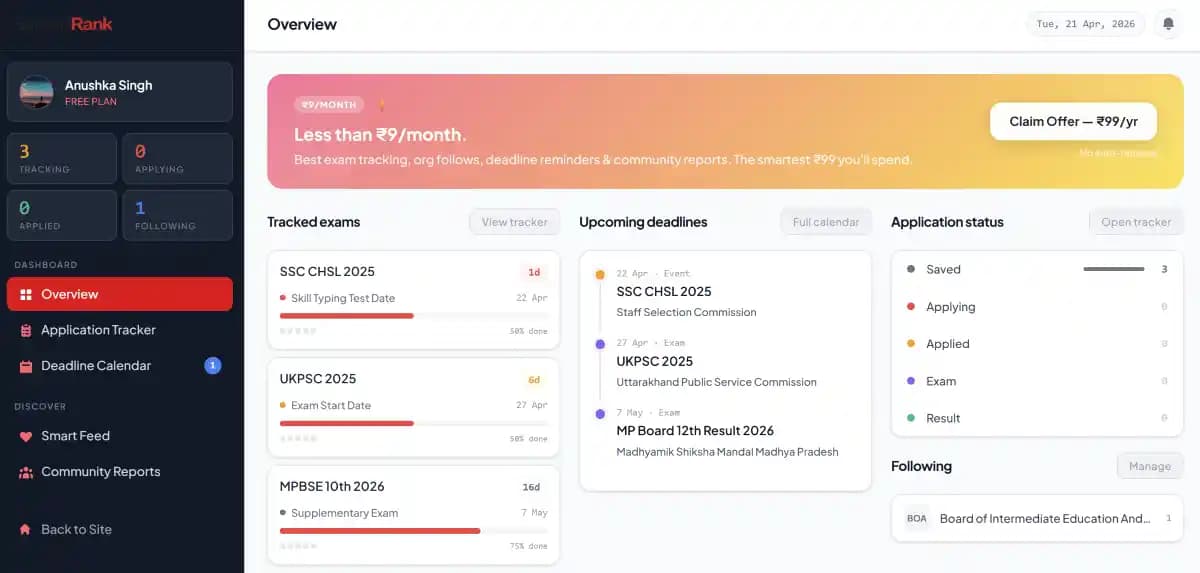
Three panels, zero tab-switching
Tracked exams on the left, upcoming deadlines in the centre, application status on the right. Everything you need for your daily 5-minute review.
Application status at a glance
See exactly how many exams are at each stage — Saved, Applying, Applied, Exam, Result. Know your pipeline without digging through individual cards.
Follow exam boards directly
Follow SSC, IBPS, RRB, or any State PSC to get notified the moment they release a new notification — before you even track a specific exam.
How it works
Three steps. Literally.
Sign up free
One-click Google or email login. No credit card, no spam.
Track any exam
Browse job posts, hit "+ Track Exam". Added instantly to your dashboard with all dates pre-filled.
Never miss a date
Get alerts 7, 3, and 1 day before every deadline. Check your dashboard for the rest.
Everything you need. Nothing you don't.
Built specifically for government exam aspirants — not a generic to-do app.
One-click exam tracking
Hit "+ Track" on any job post. Every deadline, admit card date, and result auto-populates your personal timeline.
Smart deadline alerts
Get notified 7 days, 3 days, and 1 day before critical deadlines — never miss last-date-to-apply again.
Application stage tracker
Mark your progress: Applied → Admit Card Downloaded → Exam Appeared → Result Awaited. Full visibility at a glance.
Personal exam calendar
All your tracked exams on a colour-coded monthly calendar. Conflicts? You'll see them before they sneak up on you.
Community date corrections
Crowd-sourced date updates verified by the community. If a board silently extends a deadline, you'll know first.
Official source only
Every date links back to the official notification. No rumours, no guesswork — only verified government sources.
Aspirants love it 💙
“Missed SSC CGL last year because I forgot the last date. Never again. This tracker is a lifesaver.”
“Tracking 8 exams simultaneously used to feel impossible. Now it's one screen, five minutes a day.”
“The community date corrections saved me — RPSC quietly extended the deadline and I got notified.”
Your next exam deadline is closer than you think.
Sign up in 10 seconds. Start tracking in 30. Sleep easy tonight.
Create Free AccountAlready have an account? Sign in →
Why not just use a notepad?
| Feature | examkhiladi Tracker | Notebook / Spreadsheet |
|---|---|---|
| Auto-updates when dates change | ✕ | |
| Deadline reminder alerts | ✕ | |
| Community-verified corrections | ✕ | |
| Exam calendar view | ✕ | |
| Application stage tracking | ✕ | |
| Works on mobile | Maybe | |
| Free to use |
Frequently asked questions
Everything aspirants ask about the examkhiladi Exam Tracker.
Is the examkhiladi Exam Tracker free?
Yes. Completely free — no hidden charges, no premium tier required to track exams. Sign up with Google or email and start tracking instantly.
Do I need to create an account to use the exam tracker?
Yes, a free account is required so your tracked exams and personal progress can be saved and synced across devices. Sign up takes under 10 seconds with Google.
Which government exams can I track on examkhiladi?
SSC (CGL, CHSL, MTS, GD, CPO), Railway (RRB NTPC, Group D, ALP, JE), Banking (IBPS PO/Clerk, SBI PO/Clerk, RBI Grade B), UPSC CSE/IFS, Defence (NDA, CDS, AFCAT), Teaching (CTET, DSSSB, KVS), and 1,200+ State PSC exams across all Indian states.
How many exams can I track at once?
There is no limit. Track as many exams simultaneously as you want — SSC, Railway, Banking, and State PSC all in the same dashboard. Most serious aspirants track 5–15 exams at a time.
Is examkhiladi available on mobile?
Yes. examkhiladi works on all mobile browsers. The dashboard, tracker, and deadline calendar are fully responsive. A dedicated app is also available.
How is examkhiladi different from just bookmarking official websites?
Official websites do not notify you when dates change. examkhiladi monitors them automatically, sends you reminders before deadlines, lets you track your application stage, and shows everything in one place — saving you hours every week.
Does examkhiladi cover state-level PSC exams too?
Yes. examkhiladi covers UPPSC, BPSC, MPSC, RPSC, TNPSC, APPSC, TSPSC, KPSC, GPSC, and virtually every State Public Service Commission exam in India.
Does examkhiladi cover board exams like CBSE, ICSE, or state boards?
Yes. examkhiladi tracks board exams including CBSE Class 10 & 12, ICSE, and major state board exams such as MP Board, UP Board, and AP Inter — complete with result dates and admit card schedules.
How do deadline alerts work?
Once you track an exam, examkhiladi sends automatic reminders 7 days, 3 days, and 1 day before every critical deadline — application last date, fee payment, admit card release, and exam date.
What types of deadlines does examkhiladi alert me about?
You get alerts for: application window open, last date to apply, last date for fee payment, admit card available, exam date, result declaration, document verification, and joining date.
See all 50 questions ↓Show fewer questions ↑
AlertsCan I customise how early I get deadline notifications?
The default schedule is 7 days, 3 days, and 1 day before each deadline. Custom reminder timing is available for Pro users.
AlertsWill I get notified if an exam is postponed or rescheduled?
Yes. When a board postpones an exam or changes a date, examkhiladi community members flag the change. After admin verification it is updated and you receive an instant push or email notification.
AlertsWhat happens if a board silently extends the application deadline?
This is one of the most common problems aspirants face. examkhiladi's community-verification system catches silent deadline extensions within hours. You are notified immediately so you don't accidentally miss the extended window.
AlertsCan I get WhatsApp or SMS alerts for exam deadlines?
Currently examkhiladi sends push notifications and email alerts. WhatsApp and SMS notifications are on the roadmap.
Stage TrackerWhat is application stage tracking?
Application stage tracking lets you mark your personal progress for each exam you follow: Saved → Applying → Applied → Admit Card Downloaded → Exam Appeared → Result Awaited → Selected. Your dashboard shows a colour-coded progress bar for every exam.
Stage TrackerWhat does the progress bar in the exam tracker mean?
The progress bar shows how far you are through an exam's lifecycle. For example, 50% done means the application window has closed and the exam date is approaching. 100% means the result is out.
Stage TrackerCan I mark that I have already applied for an exam?
Yes. In the Application Tracker, open the exam card and change your stage to "Applied". The dashboard overview will update your Applied count and move the card to the correct filter view.
Stage TrackerHow do I mark that I appeared for an exam?
Open the exam in your Application Tracker, click the stage dropdown, and select "Exam Appeared". This helps you track which results you are waiting for across multiple exams.
Stage TrackerWhat does "1 new" badge on an exam card mean?
The "1 new" badge means there is one new update on that exam since you last checked — such as a date change, a new notification, or a community-verified correction.
Stage TrackerCan I filter my tracked exams by stage?
Yes. The Application Tracker has filter tabs: All, Active, Upcoming, and Completed. You can quickly see only the exams where you are currently in the application stage or waiting for results.
Timeline & CalendarWhat does the exam timeline view show?
The timeline shows key milestones for each exam as dots on a horizontal line — Apply Start, Apply Last, Admit Card, Exam Date, Result. Completed milestones are shown with a green tick. Upcoming ones are shown in orange or red based on urgency.
Timeline & CalendarDoes examkhiladi have a calendar view for all exam dates?
Yes. The Deadline Calendar shows all your tracked exam deadlines on a monthly calendar. Each event is colour-coded by type — red for last dates, orange for exam dates, green for results.
Timeline & CalendarWhat is the "Upcoming Deadlines" strip at the top of the dashboard?
The Upcoming Deadlines strip is a horizontal scrollable bar showing your most imminent deadlines across all tracked exams — sorted by days remaining. It gives you a zero-effort daily brief every time you open your dashboard.
Timeline & CalendarCan I see all deadlines happening this week?
Yes. The Upcoming Deadlines strip and Deadline Calendar both filter to the current week. The strip also shows a "1 DAY LEFT" or "X DAYS LEFT" badge for urgent deadlines.
Timeline & CalendarDoes the tracker show if two exams have clashing dates?
Yes. The calendar view highlights date conflicts so you can see when two exams overlap and plan accordingly — especially useful when SSC, Railway, and Banking exams all fall in the same month.
DashboardWhat does the examkhiladi dashboard Overview show?
The Overview shows: your tracked exams with next upcoming deadline, the Upcoming Deadlines panel with dates across all exams, Application Status breakdown (Saved, Applying, Applied, Exam, Result), and the organisations you follow.
DashboardWhat are the Tracking, Applying, Applied, and Following counts on the sidebar?
These are your live counts: Tracking = total exams you are monitoring, Applying = exams you are currently in the application window for, Applied = exams you have submitted applications for, Following = exam boards/organisations you follow for instant updates.
DashboardWhat does "Following" mean in examkhiladi?
Following an organisation (like SSC, IBPS, or a State PSC) means you get notified whenever that body releases a new notification, vacancy, or date update — even before you individually track a specific exam.
DashboardCan I see my exam preparation progress across all exams?
Yes. The Application Status panel on the Overview shows how many exams are at each stage. The tracker cards show individual progress bars so you can see at a glance where you stand with every exam.
Data & AccuracyAre exam dates on examkhiladi taken from official sources?
Yes. Every exam date is sourced directly from the official board notification and linked back to it. You can always click the source link on any exam card to verify.
Data & AccuracyHow quickly are new exam notifications added to examkhiladi?
Most new notifications are added within 2–4 hours of official release. For major exams like SSC CGL, IBPS PO, and Railway NTPC, updates are typically live within 30 minutes.
Data & AccuracyHow does community date correction work?
Any registered user can flag a date discrepancy. The examkhiladi moderation team verifies against the official source and updates the date if confirmed. Users who flagged the change are notified when it goes live.
Data & AccuracyWhat if I find a wrong date on examkhiladi?
Click "Report Date" on any exam card to flag the discrepancy. Include the official source URL if possible. The team reviews and corrects it within hours.
Data & AccuracyDoes examkhiladi show the official notification PDF link?
Yes. Every exam card includes a link to the official notification PDF so you can verify dates, eligibility, and vacancy details directly from the source.
Exam-SpecificCan I track SSC CGL 2025 on examkhiladi?
Yes. SSC CGL is one of the most-tracked exams on examkhiladi. You can track all tiers — Tier 1, Tier 2, and Document Verification — with separate deadline alerts for each stage.
Exam-SpecificCan I track IBPS PO and IBPS Clerk exams?
Yes. IBPS PO, IBPS Clerk, IBPS RRB PO, and IBPS RRB Clerk are all trackable with full lifecycle coverage — from notification to final result.
Exam-SpecificDoes examkhiladi track Railway RRB exams?
Yes. All RRB exams including NTPC, Group D, ALP, JE, and RPF are tracked. Given how frequently Railway exam dates change, the community-verification feature is particularly valuable for RRB aspirants.
Exam-SpecificCan I track UPSC CSE and UPSC IFS on examkhiladi?
Yes. UPSC Civil Services (Prelims, Mains, Interview) and Indian Forest Service are tracked with full milestone timelines.
Exam-SpecificDoes examkhiladi cover police and defence exams?
Yes. SSC GD Constable, CAPF AC, NDA, CDS, AFCAT, state police constable exams, and SI recruitment exams are all covered.
Exam-SpecificCan I track teaching recruitment exams like CTET or DSSSB?
Yes. CTET, DSSSB, KVS, NVS, and state-level teacher eligibility tests (like UPTET, MPTET, REET) are all available to track.
For AspirantsI am preparing for multiple exams simultaneously. How does examkhiladi help?
examkhiladi was built specifically for this. The Overview shows your nearest deadline across all exams. The Application Tracker shows each exam's stage. The calendar shows conflicts. You get a single command centre instead of 10 browser tabs.
For AspirantsI missed an SSC exam last year because I forgot the last date. How does examkhiladi prevent this?
examkhiladi sends you reminders at 7 days, 3 days, and 1 day before every deadline — not just the exam date but the application last date, fee payment cutoff, and admit card window. Missing a deadline becomes practically impossible.
For AspirantsI am a first-year aspirant. Is examkhiladi useful for me?
Absolutely. examkhiladi helps you discover which exams you are eligible for, understand the full exam lifecycle, and plan your preparation calendar — all from day one. The Overview dashboard gives you a bird's-eye view of the entire government job landscape.
For AspirantsI already use a spreadsheet to track exam dates. Why should I switch?
Your spreadsheet does not auto-update when a board changes a date, does not send you reminders, cannot verify dates against the official source, and does not track your application stage. examkhiladi does all of this automatically, for free.
For AspirantsDoes examkhiladi help with time management and exam preparation planning?
Yes. Knowing all your deadlines in one place lets you allocate study time intelligently. When you can see that IBPS PO and SSC CHSL have overlapping windows, you can plan your preparation and application schedule without conflicts.
For AspirantsIs examkhiladi useful for students in Class 12 who want a government job?
Yes. Many central and state government exams are open to 12th pass candidates — SSC CHSL, Railway Group D, constable exams, and more. examkhiladi helps you track all exams you are eligible for from the moment you start looking.
Trust & PrivacyIs my personal data safe on examkhiladi?
Yes. examkhiladi does not sell your data. Your tracked exams and application stages are private to your account. The platform uses secure HTTPS and industry-standard authentication.
Trust & PrivacyDoes examkhiladi show advertisements?
examkhiladi shows minimal contextual ads on public pages. Your personal dashboard and Application Tracker are ad-light to keep the experience clean and focused.
Trust & PrivacyHow long has examkhiladi been running?
examkhiladi has been tracking government exam notifications since 2022 and has grown to serve over 50,000 active aspirants across India.
Trust & PrivacyCan I delete my account and data from examkhiladi?
Yes. You can delete your account and all associated data from the Account Settings page at any time.