
Quick Summary
Complete guide to SSC One Time Registration (OTR) 2026 with step-by-step process, document requirements, and common error solutions.
SSC One Time Registration (OTR) 2026 is mandatory for all SSC CGL applicants – without completing OTR on ssc.gov.in, you cannot access the application form at all. OTR creates a unique registration ID valid for all future SSC exams, eliminating the need to re-enter personal details every time. The SSC CGL 2026 notification is expected in early April 2026, so completing your OTR now saves critical time when applications open.
SSC OTR 2026 – Current Status
Portal Status: OTR facility is active on ssc.gov.in
SSC CGL 2026 Notification: Notification is released, Check here - SSC CGL 2026 notification
OTR Modification Window: Edit facility opens periodically (last opened August 2025)
Recent Update: Aadhaar-based authentication is optional but highly recommended for faster verification
Last Verified: May 2026
What is SSC One Time Registration (OTR) 2026
SSC One Time Registration (OTR) is a centralized registration system introduced by the Staff Selection Commission that allows candidates to create a single profile on the official SSC portal. Once you complete OTR, you receive a unique registration ID and password that can be used for all future SSC examinations including SSC CGL 2026, SSC CHSL 2026, SSC MTS 2026, and SSC GD Constable 2026.
The OTR system stores your personal details, educational qualifications, contact information, and uploaded documents permanently. This eliminates the need to fill the same information repeatedly for every exam. From the 2025 examination cycle onwards, SSC has made OTR compulsory for all candidates applying for any SSC recruitment.
Why SSC OTR 2026 is Mandatory for SSC CGL
Without completing SSC OTR 2026, you will not be able to log in to the SSC CGL application portal. The SSC CGL 2026 application form can only be accessed after logging in with your OTR registration ID and password. Even if you have previously registered on the old SSC website (ssc.nic.in), you must complete fresh OTR on the new portal (ssc.gov.in) as the old system is no longer functional.
SSC OTR 2026 also enables Aadhaar-based authentication at multiple stages – during registration, application submission, biometric verification at exam centers, and document verification during joining. Candidates who complete Aadhaar authentication during OTR can enter exam halls earlier and avoid carrying multiple identity documents.
Documents Required for SSC OTR Registration 2026
Keep these documents ready before starting your SSC OTR 2026 registration process. You will need them during different stages of the registration.
Identity Proof (Choose One)
- Aadhaar Card (recommended for faster verification)
- PAN Card
- Passport
- Voter ID Card
- Driving License
Educational Documents
- Class 10th Marksheet – for board name, roll number, and year of passing
- Class 12th Marksheet – for intermediate qualification details
- Graduation Marksheet – for degree details (required for SSC CGL)
Category Certificates (If Applicable)
- Caste Certificate – for SC/ST/OBC candidates
- EWS Certificate – issued after January 1, 2025
- Disability Certificate – if claiming PwD benefits
Digital Files for Upload
- Recent color photograph – 3.5 cm × 4.5 cm, 20–50 KB, JPEG format, 200×230 pixels
- Signature – 4.0 cm × 2.0 cm, 10–20 KB, JPEG format, 140×60 pixels, done with black or blue ink on white paper
Contact Details
- Active mobile number for OTP verification
- Valid email ID for registration confirmation
Important: Your name and date of birth in OTR must exactly match your Class 10th marksheet. Even a single character difference can cause rejection during document verification. Double-check spelling, spacing, and format before final submission.
Step-by-Step SSC OTR Registration Process 2026
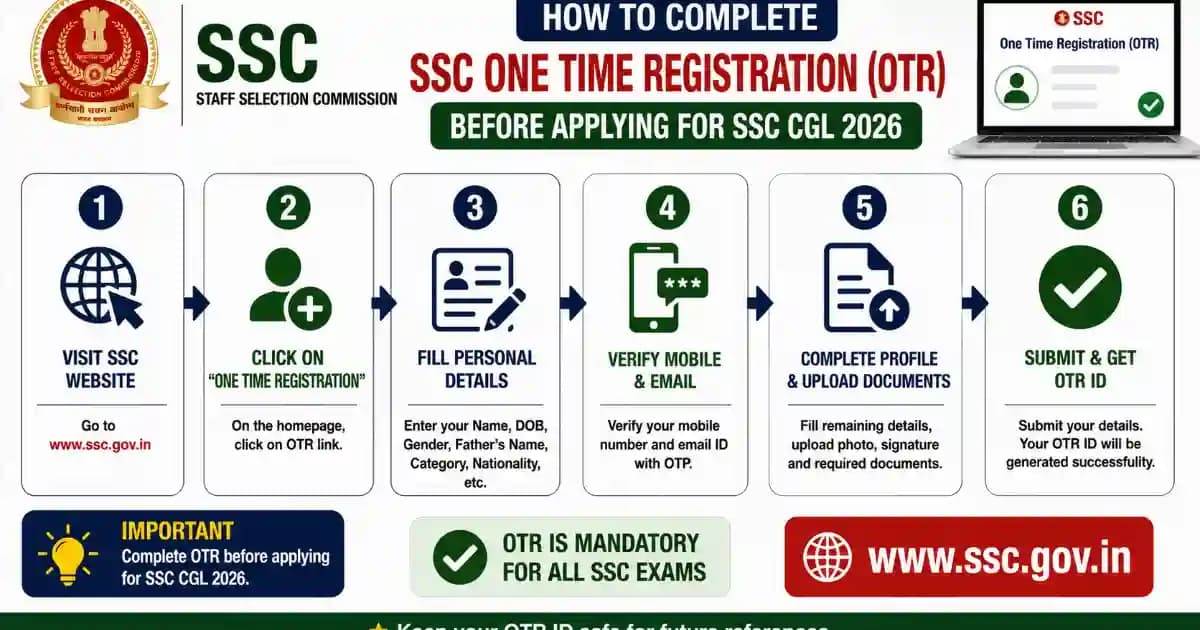
Follow these exact steps to complete your SSC One Time Registration 2026. The process takes approximately 15–20 minutes if you have all documents ready.
Step 1: Visit the Official SSC Website
Open your web browser and go to the official Staff Selection Commission website at ssc.gov.in. Make sure you are on the correct official website and not any third-party portal. The official SSC portal has a .gov.in domain.
Step 2: Click on Register Now
On the homepage, locate the login section. You will find a link labeled "Register Now" or "New Candidate Registration" below the login window. Click on this link to start the OTR process. This will open the SSC One Time Registration form.
Step 3: Enter Basic Details
On the registration page, fill in your basic information carefully. Enter your full name exactly as it appears on your Class 10th marksheet. Select your date of birth from the calendar. Choose your gender from the dropdown menu. Enter your father's name and mother's name as per official records.
Step 4: Choose Aadhaar or Alternative ID
You will see an option to select your identity verification method. If you choose Aadhaar-based registration, enter your 12-digit Aadhaar number. The system will verify it through OTP sent to your Aadhaar-linked mobile number. If you do not wish to use Aadhaar, select the alternative option and choose from PAN Card, Passport, Voter ID, or Driving License. Enter the document number and upload a clear scanned copy.
Mobile Users: SSC OTR 2026 can be completed on mobile phones, but desktop or laptop is recommended for better photo upload quality and easier form navigation. If using mobile, ensure you have a stable internet connection and your browser is updated.
Step 5: Enter Contact Information
Provide your active mobile number and email ID. Make sure these are working and accessible to you. The SSC will send your registration ID and password to these contact details. Enter a 10-digit mobile number without country code. Type your email address carefully and verify it once before proceeding.
Step 6: Verify Mobile and Email with OTP
After entering your contact details, click on "Send OTP". You will receive a 6-digit OTP on your mobile number via SMS and another OTP on your email. Enter both OTPs in the respective fields within the time limit (usually 10 minutes). If you do not receive OTP, click on "Resend OTP" after waiting for 2 minutes.
Step 7: Create Password and Security Questions
Create a strong password for your SSC account. The password must be 8–12 characters long and include at least one uppercase letter, one lowercase letter, one number, and one special character. Re-enter the same password in the confirmation field. Select four security questions from the dropdown menu and provide answers. These will be used for password recovery in case you forget your login details.
Step 8: Submit Initial Registration
After completing all fields, review your entries carefully. Click on the "Submit" button at the bottom of the page. The system will generate your SSC Registration ID (also called OTR ID). This is an 11-digit number that will be your login username for all future SSC applications. Note down this registration ID immediately. You will also receive it on your registered mobile number and email.
Step 9: Login with Registration ID
After receiving your registration ID, go back to the SSC homepage at ssc.gov.in. Click on "Login". Enter your 11-digit registration ID as username and the password you created. Complete the captcha verification and click "Login" to access your dashboard.
Step 10: Fill Detailed Profile Information
Once logged in, you will be directed to complete your full OTR profile. This section requires detailed information that will be used across all SSC exams. Fill in the following sections carefully.
Personal Details: Confirm your name, date of birth, gender, and parent names. Select your category (General/SC/ST/OBC/EWS). If claiming reservation, you will need to provide certificate details later. Choose your nationality as Indian. Provide your visible identification mark (like mole on left cheek, scar on forehead, etc).
Address Details: Enter your permanent address with house number, street, village/town, district, state, and PIN code. Enter your present address. If both addresses are same, tick the checkbox to auto-fill. Provide state of eligibility for exams that have state quotas.
Educational Qualifications: Enter details from your Class 10th marksheet including board name, roll number, year of passing, and percentage. Add Class 12th details if applicable. For SSC CGL, add your graduation details including university name, degree type, year of passing, and percentage. If you have additional qualifications, you can add them using the "Add More" button.
Category Certificate Details (if applicable): If you selected SC/ST/OBC/EWS category, enter your certificate number, issuing authority, and date of issue. Upload a scanned copy of your category certificate.
Disability Details (if applicable): If you are a Person with Disability (PwD), select your disability type and percentage. Enter your disability certificate number and upload the certificate. Specify if you need a scribe for examination.
Step 11: Upload Photo and Signature
This is the most critical step where many applications get rejected due to incorrect format. Upload your recent color photograph first. The photo must be a passport-size image with 3.5 cm width and 4.5 cm height. The file size must be between 20 KB and 50 KB. The image should be in JPEG or JPG format only. The recommended pixel dimensions are 200 pixels width by 230 pixels height. Your photo must have a plain white or light-colored background with your full face clearly visible and centered.
Next, upload your signature. Sign on a white sheet of paper using black or blue ink pen. Scan or photograph it clearly. The signature image should be 4.0 cm width by 2.0 cm height. The file size must be between 10 KB and 20 KB. The format should be JPEG or JPG only. The recommended pixel dimensions are 140 pixels width by 60 pixels height. Make sure your signature is clear, legible, and done in landscape orientation.
Photo & Signature Upload Tips: Use a photo editing tool or online resizer to match exact specifications. Blurred, oversized, or incorrectly formatted images will be rejected automatically. Test your files before final upload. For live photo capture option (if available), ensure good lighting and sit at eye level with camera.
Step 12: Accept Declaration and Final Submit
After filling all sections and uploading documents, scroll to the bottom of the form. Read the declaration statement carefully. It states that all information provided is true and correct. Tick the checkbox to accept the declaration. Click on the "Final Submit" button. The system will ask for confirmation – click "Yes" to proceed.
Step 13: Complete OTP Verification
After final submission, you will receive an OTP on your registered mobile number and email. Enter the OTP to confirm your registration. This is the last step of the OTR process. Once verified, your SSC One Time Registration 2026 is complete.
Step 14: Download and Print Confirmation
After successful registration, your dashboard will show a confirmation message. Download the OTR confirmation page as PDF. This contains your registration ID, personal details, and uploaded photo and signature. Print this page and keep it safe for future reference. You will need your registration ID to apply for SSC CGL 2026 and all other SSC exams.
Registration Complete: Your SSC OTR 2026 is now active and valid for all future SSC examinations. When SSC CGL 2026 notification is released, simply login with your registration ID to fill the application form. Your personal and educational details will be pre-filled, saving you time during the application process.
SSC OTR Aadhaar Authentication 2026 – Benefits & Process
SSC offers optional Aadhaar-based authentication during OTR registration. While it is not mandatory, choosing Aadhaar authentication provides significant benefits throughout the examination process. Candidates who opt for Aadhaar verification can enter exam centers up to 2 hours after the gate closing time, while non-Aadhaar candidates must report at least 2 hours before gate closure. Aadhaar authentication also eliminates the need to carry physical identity documents and photographs to the exam center, as your identity is verified through biometric authentication.
The Aadhaar authentication process happens at multiple stages. During OTR, your Aadhaar number is verified through OTP sent to your Aadhaar-linked mobile. When you submit exam applications, face authentication using your Aadhaar photo is done. At exam centers, fingerprint or iris-based biometric verification is conducted. During document verification and joining, Aadhaar authentication confirms your identity.
If you do not choose Aadhaar authentication, you must upload one valid ID proof from PAN Card, Passport, Voter ID, Driving License, Birth Certificate, or School Certificate. You will also need to carry the original ID document and recent passport-size photographs to every exam.
Common Problems During SSC OTR 2026 & Solutions
| Problem | Solution |
|---|---|
| OTP not received on mobile or email | Wait for 2 minutes and click Resend OTP. Check spam folder for email OTP. Ensure mobile number is not in DND mode. Try alternative email or mobile if available. Clear browser cache and retry. |
| Photo or signature upload rejected – file size too large or too small | Use online image compressor tools to reduce file size to exactly 20–50 KB for photo and 10–20 KB for signature. Resize image dimensions to 200×230 pixels (photo) and 140×60 pixels (signature) using photo editor. Convert PNG or other formats to JPEG before upload. |
| Failed to Update Advt Details error during final submission | This is a server-side error common during peak hours. Wait for 2–3 hours and retry submission. Clear browser cache and cookies. Try using a different browser like Chrome or Firefox. Attempt submission during off-peak hours (early morning or late night). |
| Aadhaar OTP verification failing repeatedly | Ensure your Aadhaar is linked to your mobile number – verify at UIDAI portal. If Aadhaar-mobile linking is pending, choose alternative ID proof option instead. Contact Aadhaar helpline 1947 to resolve linking issues before attempting OTR. |
| Name mismatch between Aadhaar and Class 10th marksheet | OTR requires name exactly as per Class 10th marksheet, not Aadhaar. If there is a difference, choose alternative ID option and upload 10th marksheet as proof. Update your Aadhaar name through UIDAI if needed for future verification stages. |
| Registration ID not received after submission | Check spam or junk folder in email. If not received within 30 minutes, login to SSC portal using mobile number and password – your registration ID will be displayed on dashboard. Contact SSC helpline at regional office numbers provided on ssc.gov.in. |
| Unable to edit OTR details after submission | SSC opens OTR modification windows periodically (usually before major exams). Wait for official edit window announcement on ssc.gov.in. Minor corrections may be allowed during individual exam applications. For critical errors, contact SSC helpdesk immediately with registration details and supporting documents. |
| Face authentication failing during application submission | Ensure good lighting with plain background. Remove glasses, cap, or mask during authentication. Face the camera directly at eye level. Use desktop or laptop webcam instead of mobile for better quality. Try during different times of day for better lighting conditions. |
Server Issues Alert: SSC portal experiences high traffic during application periods. If you face repeated errors, attempt registration during early morning hours (6 AM – 9 AM) or late night (10 PM – 1 AM) when server load is lower. Save your progress frequently if the portal provides draft save option.
How to Login to SSC Portal After OTR 2026
After completing your SSC OTR registration, you can login to the SSC portal anytime to check your profile, apply for exams, or download admit cards. Go to ssc.gov.in and click on the Login button on the homepage. Enter your 11-digit SSC Registration ID in the username field. Enter the password you created during OTR. Complete the captcha verification by typing the characters shown. Click on Login to access your dashboard.
If you forget your password, click on Forgot Password link on the login page. Enter your registration ID and registered mobile number or email. Answer the security questions you selected during registration. You will receive a password reset link on your email or OTP on mobile to create a new password.
SSC OTR Modification Window 2026
SSC periodically opens OTR modification or correction windows to allow candidates to edit their registration details. The last modification window was open from August 14, 2025 to August 31, 2025. During the edit window, candidates can update most personal and contact details including name (with supporting documents), father's name, mother's name, date of birth (with proof), mobile number, email address, educational qualification details, category or sub-category (with valid certificates), and re-upload photo or signature.
However, certain core fields cannot be edited even during modification window. These include Aadhaar number once verified, registration ID (this is permanent), and sometimes permanent address linked to Aadhaar. To edit your OTR during the active modification window, login to ssc.gov.in with your registration ID. Look for Edit OTR or Modify Registration link on your dashboard. Select the fields you want to change and enter correct information. Upload supporting documents if required for name or DOB changes. Submit the modifications and verify through OTP.
Edit Window Alert: Keep checking ssc.gov.in for modification window announcements. SSC usually opens edit facility 2–3 times per year before major recruitment cycles. Follow SSC's official social media or subscribe to email alerts to get notified when the edit window opens.
Using SSC OTR for SSC CGL 2026 Application
Once your SSC OTR 2026 is complete, applying for SSC CGL 2026 becomes much simpler. When the SSC CGL 2026 notification is released (expected in April 2026), login to ssc.gov.in using your OTR registration ID and password. On your dashboard, you will see the SSC CGL 2026 application link under Active Recruitments or Latest Notifications. Click on Apply Now for SSC CGL 2026.
The application form will open with most fields pre-filled from your OTR profile including your personal details, educational qualifications, category, and uploaded documents. You only need to select your exam preferences such as preferred post (Tax Assistant, Inspector, Auditor, etc), preferred exam center city, and medium of examination. Upload any additional documents required specifically for SSC CGL. Pay the application fee of ₹100 (exempted for women and reserved category candidates). Review all details carefully and submit the application. Download and print the application confirmation for your records.
Important Points to Remember for SSC OTR 2026
- Complete SSC OTR before SSC CGL 2026 notification is released to avoid last-minute rush and server issues.
- Your OTR registration ID is permanent and valid for lifetime – you will use it for all future SSC exams.
- Name and date of birth must exactly match your Class 10th marksheet character by character.
- Photo and signature specifications are strictly enforced – incorrect uploads lead to automatic rejection.
- Aadhaar authentication is optional but provides faster entry at exam centers and eliminates document carrying.
- Keep your registration ID, password, and OTR confirmation page safely – you will need them repeatedly.
- OTR cannot be edited freely – wait for official modification windows announced by SSC.
- One person can have only one OTR – creating duplicate registrations may lead to disqualification.
- Provide genuine and verifiable information – false details will be caught during document verification.
- The old SSC website ssc.nic.in is defunct – all new registrations must be done on ssc.gov.in only.
Pro Tip: Complete your SSC OTR 2026 at least 15 days before any major SSC exam notification. This gives you enough time to resolve any issues, wait for edit windows if needed, and apply for the exam without stress on the last date.
Frequently Asked Questions on SSC OTR 2026
Is SSC One Time Registration 2026 mandatory for all candidates?
Yes, SSC OTR 2026 is mandatory for all candidates applying for any SSC exam from 2025 examination cycle onwards. Without completing OTR, you cannot access the application form for SSC CGL, CHSL, MTS, GD, or any other SSC recruitment. Even if you previously registered on the old SSC portal (ssc.nic.in), you must complete fresh OTR on the new website ssc.gov.in as the old registrations are no longer valid.
Can I use my SSC OTR registration ID for multiple exams?
Yes, your SSC OTR registration ID is permanent and can be used for all future SSC examinations. Once you complete OTR, you receive an 11-digit registration ID that serves as your login username for applying to SSC CGL, SSC CHSL, SSC MTS, SSC GD Constable, SSC Stenographer, and all other SSC recruitments. You do not need to create separate registrations for different exams – one OTR ID is sufficient for lifetime.
What if my name in Aadhaar card is different from my Class 10th marksheet?
Your name in SSC OTR must match your Class 10th marksheet exactly, not your Aadhaar. If there is any difference between your Aadhaar name and 10th marksheet name, choose the alternative ID proof option during OTR instead of Aadhaar authentication. Upload your 10th marksheet or another ID document that matches your 10th certificate. You can later update your Aadhaar name through UIDAI if needed for biometric verification stages.
How long does SSC OTR 2026 registration process take?
The complete SSC OTR 2026 registration process takes approximately 15 to 20 minutes if you have all required documents and properly formatted photo and signature ready. The process involves basic registration, OTP verification, detailed profile filling, document upload, and final submission. However, if you face technical issues or need to resize your photo and signature, it may take longer. It is advisable to keep at least 30–45 minutes for the entire process to avoid rushing.
Is Aadhaar card compulsory for SSC OTR registration?
No, Aadhaar card is not compulsory for SSC OTR registration. Aadhaar-based authentication is optional. If you do not wish to use Aadhaar, you can choose alternative ID proof option and upload any one of these documents – PAN Card, Passport, Voter ID, Driving License, Birth Certificate, or School Certificate. However, Aadhaar authentication is recommended as it provides benefits like early entry to exam centers and eliminates the need to carry physical documents on exam day.
Can I edit my SSC OTR details after final submission?
You cannot edit your SSC OTR details immediately after submission. SSC opens periodic OTR modification windows (usually 2–3 times per year) where candidates can edit most details except core fields like registration ID and verified Aadhaar number. The last modification window was open from August 14 to August 31, 2025. During the edit window, you can update name, contact details, educational qualifications, category, and re-upload photo or signature. Keep checking ssc.gov.in for modification window announcements.
What are the photo and signature size requirements for SSC OTR 2026?
For photo, the size should be 3.5 cm width by 4.5 cm height with file size between 20 KB to 50 KB in JPEG format, with recommended pixel dimensions of 200×230 pixels. For signature, the size should be 4.0 cm width by 2.0 cm height with file size between 10 KB to 20 KB in JPEG format, with recommended pixel dimensions of 140×60 pixels. Photo must have plain white or light background with full face clearly visible. Signature must be done with black or blue ink on white paper and scanned clearly.
I forgot my SSC registration ID or password – how can I recover it?
If you forgot your SSC registration ID, login to ssc.gov.in using your registered mobile number or email – your registration ID will be displayed on the dashboard. Alternatively, check your email inbox or SMS for the registration confirmation message sent during OTR. If you forgot your password, click on Forgot Password link on the login page, enter your registration ID and registered mobile or email, answer your security questions, and you will receive a password reset link or OTP to create new password.
What happens if I create duplicate SSC OTR by mistake?
Creating duplicate OTR registrations using the same personal details can lead to serious issues including application rejection or disqualification from exams. SSC's system may flag duplicate registrations during verification. If you accidentally created multiple registrations, immediately contact SSC helpdesk with both registration IDs and supporting documents. Provide written request to merge or deactivate the duplicate account. In future, use only the original registration ID for all applications and never create a second OTR.
When should I complete SSC OTR 2026 for SSC CGL exam?
You should complete your SSC OTR 2026 as soon as possible, ideally at least 15–20 days before the expected SSC CGL 2026 notification date (first week of April 2026). Early registration gives you sufficient time to resolve any technical issues, correct errors if an edit window opens, and familiarize yourself with the SSC portal. Completing OTR early also helps you avoid server congestion and last-minute rush when the SSC CGL application deadline approaches. Your OTR remains valid permanently for all future exams.
Disclaimer: The information provided in this guide is compiled from official SSC sources and is accurate as of May 2026. SSC OTR process, requirements, and modification windows are subject to change as per official SSC notifications. Candidates are advised to verify all details on the official SSC website ssc.gov.in before proceeding with registration. SarkariRank.com is not responsible for any changes or updates made by SSC after the publication of this guide. Always refer to the latest official notification for the most current information.