
Quick Summary
Complete checklist of documents required, entry rules, dress code and banned items for UPSC IAS Prelims 2026 exam day. Know reporting time and ID proof rules.
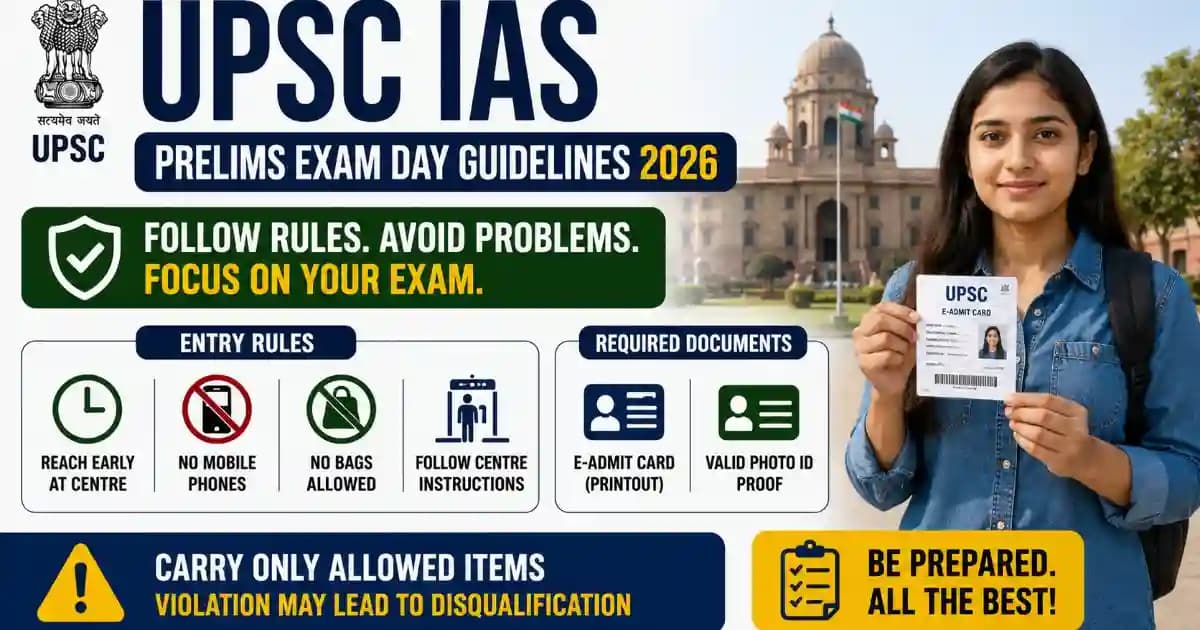
The UPSC Civil Services (IAS/IFS) Preliminary Examination 2026 requires strict adherence to exam centre rules and document submission guidelines. This complete checklist covers mandatory documents, reporting time, photo ID requirements, dress code, banned items list and admit card correction process to ensure smooth entry on exam day.
UPSC Prelims 2026 Exam Day Status
- Exam Date: Sunday, May 25, 2026 (General Studies Paper I: 9:30 AM – 11:30 AM | CSAT Paper II: 2:30 PM – 4:30 PM)
- Reporting Time: 8:30 AM for Morning Session | 1:30 PM for Afternoon Session
- Entry Closes: 9:00 AM (Paper I) | 2:00 PM (Paper II) – No entry allowed after gate closure
- Admit Card Download: Available from May 10, 2026 onwards at UPSC Admit Card Portal
- Verification Status: Information verified from UPSC official notification dated May 2026
Documents Required at Exam Centre for UPSC IAS Prelims 2026
You must carry the following mandatory documents to the UPSC Civil Services Preliminary Examination 2026 centre. Without these documents, entry will be denied and you will not be allowed to appear in the examination.
Mandatory Documents Checklist
| Document | Requirements | Important Notes |
|---|---|---|
| UPSC Admit Card 2026 | Original printed copy with clear photograph | Black & white or colour printout accepted. Must be printed on A4 size paper. Mobile/digital copies NOT allowed |
| Valid Photo ID Proof | Original government-issued ID matching admit card details | Photocopy NOT accepted. ID must be valid and not expired. See accepted ID list below |
| Photograph (Extra) | 2 recent passport-size colour photographs (same as on admit card) | White background. Write your name and registration number on back of photos |
| COVID-19 Self-Declaration | If required by UPSC (check official notification) | Download format from UPSC website. Fill and sign before exam day |
Photo ID Rules 2026: Accepted ID Proof List for UPSC Prelims
UPSC accepts only government-issued photo identity documents. Your ID proof must show your photograph, name and date of birth clearly. The name on your ID must exactly match the name printed on your admit card.
List of Accepted Photo ID Documents
| Photo ID Type | Issuing Authority | Special Instructions |
|---|---|---|
| Aadhaar Card (with photograph) | UIDAI | Must have your photograph printed on card. E-Aadhaar accepted if original downloaded from UIDAI portal |
| Voter ID Card (EPIC) | Election Commission of India | Most commonly used. Should be original laminated card |
| PAN Card | Income Tax Department | Original PAN card with photograph. E-PAN downloaded from IT portal accepted |
| Driving Licence | State Transport Authority | Must be valid and not expired on exam day |
| Passport | Ministry of External Affairs | Valid passport only. Expired passport NOT accepted |
| Bank Passbook with Photograph | Scheduled Bank | Only passbooks from nationalized/scheduled banks with attested photograph |
| Government Employee ID Card | Central/State Government | Must be current and valid. Includes railway pass, defence ID |
| Student ID Card (University/College) | Recognized University | Valid only for students. Must have photograph and university seal |
⚠️ Important ID Verification Rules
- Photocopies or scanned copies of ID proof are NOT accepted under any circumstances
- Name on ID must match exactly with name on admit card – even spelling mistakes can cause rejection
- Damaged or mutilated ID cards may not be accepted at the discretion of exam superintendent
- If your ID does not have date of birth, carry birth certificate as additional proof
- For name mismatch issues, carry supporting documents like marriage certificate or gazette notification
Exam Centre Rules 2026: What to Carry & What Is Banned at UPSC Prelims
UPSC maintains strict security protocols at examination centres. Knowing what items are allowed and what items are prohibited will save you time during security check and prevent disqualification.
Allowed Items Inside Examination Hall
| Item Category | Allowed Items | Instructions |
|---|---|---|
| Stationery | Black ballpoint pen, pencil, eraser, sharpener, scale | Use only black ballpoint pen for marking OMR sheet. Gel pens NOT recommended |
| Water & Food | Transparent water bottle (label removed), plain chocolate bar/candy | Only transparent bottles allowed. Remove all labels. Small snacks for energy permitted |
| Medical Items | Essential medicines with prescription, glucose tablets | Carry doctor's prescription for medicines. Inform invigilator before exam |
| Personal Items | Small transparent pouch for keeping above items | Only clear/transparent pouches allowed. No opaque bags inside hall |
| For Specially-Abled | Hearing aids, wheelchairs, crutches, scribe materials (if approved) | Must be mentioned in admit card. Carry approval letter from UPSC |
Prohibited Items – Banned at Exam Centre 2026
| Category | Banned Items | Consequences |
|---|---|---|
| Electronic Devices | Mobile phones, smartphones, smartwatches, Bluetooth devices, calculators, tablets, laptops | Possession leads to immediate disqualification and 3-year ban from all UPSC exams |
| Communication Devices | Wireless earphones, microphones, pagers, scanning devices, cameras | Treated as unfair means case – exam cancelled and police complaint filed |
| Study Material | Books, notes, printed material, question banks, previous year papers, pocket dictionaries | Immediate removal from exam hall. Result declared invalid |
| Bags & Accessories | Handbags, purses, wallets (except transparent pouch), belts with metal buckles, jackets with multiple pockets | Not allowed inside hall. Must be deposited at designated area at your own risk |
| Wearables | Watches of any kind (digital/analog), fitness bands, ornaments with storage capacity | Wall clock provided in exam hall. Personal watches strictly prohibited |
| Stationery Items | Coloured pens, highlighters, correction fluid/tape, geometry box (except scale), log tables | Only specified stationery allowed. Others will be confiscated |
| Food Items | Packaged food, tiffin boxes, beverages (except water), wrapped items | Only specified items allowed. Must be in open/unwrapped form |
| Other Items | Goggles, caps, cigarettes, lighters, matches, any paper slips | Confiscation and possible investigation for unfair means |
⚠️ Mobile Phone Warning – Zero Tolerance Policy
UPSC follows absolute zero tolerance for mobile phones and electronic gadgets. Even if your phone is switched off and kept in your pocket, bag or with a friend outside the hall – if discovered during frisking, you will be disqualified and debarred for 3 years from all UPSC examinations. Leave your mobile phone at home or in your vehicle parked outside the centre premises.
UPSC Prelims 2026 Dress Code & Entry Time Rules
Dress Code Guidelines for Exam Day
While UPSC does not mandate a specific dress code, you must wear clothing that allows security personnel to conduct frisking easily and does not violate examination centre decorum.
- Recommended Dress: Simple shirt/t-shirt with trousers or salwar-kameez without heavy embellishments
- Footwear: Simple slippers or sandals without hidden compartments. Sports shoes allowed but will be checked
- Avoid: Clothes with multiple pockets, jackets, hoodies, caps, heavy jewellery, clothes with metallic embellishments
- Religious Attire: Allowed but subject to security check. Remove for verification if asked by exam superintendent
- Winter Clothing: If required due to cold weather, wear simple sweater. Heavy jackets must be deposited outside hall
Reporting Time and Entry Rules 2026
| Timing | Activity | Action Required |
|---|---|---|
| 8:00 AM | Centre opens for Paper I | Security check begins. Reach centre by this time for smooth entry |
| 8:30 AM | Recommended reporting time | Complete frisking and document verification. Locate your seat |
| 9:00 AM | Entry gates close for Paper I | No candidate allowed entry after this time – even with valid admit card |
| 9:30 AM – 11:30 AM | Paper I (General Studies) | Exam duration: 2 hours |
| 1:00 PM | Centre reopens for Paper II | Fresh entry and security check for afternoon session |
| 1:30 PM | Recommended reporting time | Complete verification and settle at desk before gate closure |
| 2:00 PM | Entry gates close for Paper II | Strictly no late entry. Plan commute considering traffic/parking |
| 2:30 PM – 4:30 PM | Paper II (CSAT) | Exam duration: 2 hours |
Security Check & Frisking Process at UPSC Exam Centre 2026
Every candidate undergoes mandatory security frisking at the exam centre entrance. Understanding this process helps you prepare mentally and saves time during entry.
Step-by-Step Security Check Process
- Initial Queue: Stand in designated male/female queue outside centre premises. Maintain social distancing as per guidelines
- Admit Card Verification: Show printed admit card and photo ID to security personnel at entry gate
- Physical Frisking: Male candidates frisked by male staff, female candidates by female staff in separate area
- Metal Detector Check: Walk through metal detector. Remove metallic items (keys, coins, belt) and place in tray
- Bag Check: If carrying any bag (deposited outside), contents thoroughly checked before deposit
- Document Re-verification: Exam superintendent verifies admit card against attendance register inside hall
- Seat Allocation: Locate your seat using registration number displayed on desk. Settle quietly
- Final Check: Invigilator verifies your photograph on admit card with your face before distributing OMR sheet
💡 Smart Tips for Quick Entry
- Reach exam centre at least 45 minutes before gate closure time
- Keep admit card and ID proof in hand (not in bag) for quick verification
- Wear minimal jewellery and simple clothes to speed up frisking process
- If you have vehicle, park it far from exam centre to avoid last-minute parking search
- Use washroom before entering exam hall – mid-exam exits allowed only in emergency
- Keep your registration number memorized – helps locate seat quickly
Admit Card 2026 Errors? How to Correct Name, Photo or Exam Centre Issues
Mistakes in your UPSC Civil Services Preliminary Examination 2026 admit card must be corrected before exam day. Here is the exact process to fix different types of errors.
Types of Admit Card Errors and Correction Process
| Error Type | Correction Process | Timeline |
|---|---|---|
| Name Spelling Error | Email UPSC at [email protected] with subject "Name Correction – Roll Number [Your Roll No]". Attach ID proof showing correct name | Email at least 7 days before exam. UPSC updates database and issues corrigendum |
| Photo Not Visible/Mismatch | Download fresh admit card copy. If issue persists, email UPSC with your registration number and correct photograph in JPG format (size: 10-50 KB) | Immediate action required. UPSC may ask you to carry extra photographs on exam day |
| Signature Missing/Unclear | Acceptable as long as original documents are clear. Carry extra signed blank paper if worried | No correction needed. Sign OMR sheet clearly on exam day |
| Date of Birth Wrong | Send written application to UPSC with subject "DOB Correction Request" attaching birth certificate, marksheet showing correct DOB | Must be done immediately. UPSC may take 3-5 days to update |
| Exam Centre Change Request | NOT allowed once admit card issued. Centre allotment is final as per UPSC policy | No timeline – correction not possible |
| Category (SC/ST/OBC) Wrong | Email UPSC with subject "Category Correction – [Roll No]" with valid category certificate | Send email within 24 hours of downloading admit card |
| Medium of Exam Wrong | NOT correctable after admit card download. You must appear in medium mentioned on admit card | Not applicable – correction not possible |
| PWD Status Not Marked | Email UPSC with subject "PWD Status Update" attaching disability certificate and scribe approval (if applicable) | Critical – email immediately. Affects seating arrangement and scribe allocation |
UPSC Helpdesk Contact for Admit Card Issues
| Contact Method | Details | Response Time |
|---|---|---|
| [email protected] | 48-72 hours (working days only) | |
| Phone | 011-23381125, 011-23385271, 011-23098543 | 10:00 AM – 5:00 PM (Monday to Friday) |
| UPSC Office | Dholpur House, Shahjahan Road, New Delhi – 110069 | Visit in person for urgent cases only |
| Official Website | www.upsc.gov.in | Check "Latest Updates" section for admit card correction notices |
⚠️ Important Note on Admit Card Corrections
UPSC takes 3-5 working days to process correction requests. Send your email immediately after identifying error. Do not wait until last moment. If correction is not processed before exam day and error is minor (name spelling), carry supporting original documents to exam centre and inform exam superintendent. For major errors, contact UPSC phone helpline for urgent resolution.
Common Problems on UPSC Exam Day 2026 & How to Solve Them
| Problem | What It Means | Exact Solution |
|---|---|---|
| Forgot to bring admit card | No admit card = No entry to exam centre | NO SOLUTION on exam day. Admit card is absolutely mandatory. If you forgot it at home and home is nearby, immediately rush back to get it before gate closure. If home is far, you cannot appear in exam that day. Always keep backup printout in bag one day before exam |
| Forgot photo ID proof at home | Photo ID is second mandatory document | Try showing any alternative ID from accepted list to exam superintendent. If you have e-Aadhaar or e-PAN downloaded on your phone (which you must deposit outside), request staff to let you show it once under supervision. Otherwise no entry possible. Prevention: Keep ID proof in wallet permanently |
| Name on ID does not match admit card | Minor spelling difference can cause rejection | Carry supporting documents proving both names belong to you – marriage certificate (for married women), gazette notification (for legal name change), school leaving certificate. Approach exam superintendent before exam starts and explain situation. UPSC may allow entry with undertaking form |
| Reached after gate closure time | Gates close at 9:00 AM (Paper I) and 2:00 PM (Paper II) | NO SOLUTION. UPSC does not allow late entry under any circumstances – even 1 minute late means no entry. No excuses accepted (traffic, rain, vehicle breakdown). Prevention: Reach centre 45-60 minutes before gate closure. If Paper I missed, you can still appear for Paper II |
| Mobile phone found during frisking | Possession = Immediate disqualification + 3 year ban | Before security check, deposit mobile phone with friend/family member waiting outside centre. If no one available, leave it in your locked vehicle. If you reach centre alone with phone, hand it to centre staff at deposit counter – they may allow you to retrieve it after exam at your own risk. Never ever carry phone inside exam premises |
| OMR sheet damaged or torn | Scanning machine cannot read damaged OMR | Immediately inform invigilator. Request replacement OMR sheet. Re-mark all answers on new sheet carefully. Invigilator will note the issue in attendance register. Do not panic – replacement is allowed |
| Question paper not received | Centre staff may have missed distributing to your desk | Raise hand immediately when invigilator announces "Open question booklet". Inform that you did not receive question paper. Fresh booklet will be provided. Do not wait silently – time is important |
| Feeling sick or need urgent washroom | Medical emergency or nature call during exam | Inform invigilator immediately. You will be escorted to washroom under supervision (one staff member will stand outside). Exam time will not be extended. If serious medical issue, exam superintendent may allow you to leave but you cannot re-enter. Carry necessary medicines as mentioned in allowed items list |
| Centre address different from admit card | UPSC may change centre due to unavoidable reasons | Check UPSC website and your registered email 2 days before exam for any centre change notification. If you reach wrong centre, call UPSC helpline immediately. They may issue approval to appear at nearest centre. Always verify centre address from admit card one day before exam |
| Power cut or AC not working in hall | Environmental discomfort during exam | Inform exam superintendent if temperature is affecting your performance. UPSC may extend exam time by 5-10 minutes as compensation. For power cuts, exam continues as scheduled – question paper reading remains possible. Focus on exam despite discomfort. File official complaint after exam if needed |
Frequently Asked Questions (FAQ) – UPSC IAS Prelims Exam Day Rules 2026
What time should I reach the UPSC Prelims exam centre?
Reach the exam centre by 8:30 AM for Paper I and 1:30 PM for Paper II. Entry gates close at 9:00 AM and 2:00 PM respectively and no candidate is allowed entry after gate closure, even if you have a valid admit card. Security check and frisking take 15-20 minutes, so arriving 45 minutes before gate closure is recommended. Plan your journey considering traffic conditions and parking availability near the exam centre.
Is Aadhaar card mandatory for UPSC Prelims 2026 or can I use other ID proof?
Aadhaar card is NOT mandatory. UPSC accepts multiple photo ID proofs including Voter ID, PAN card, Passport, Driving Licence, Bank Passbook with photograph, Government employee ID card and University student ID card. You can use any one valid original photo ID document that shows your photograph and the name printed must match exactly with your admit card name. Photocopies are not accepted.
Can I carry my mobile phone to the UPSC exam centre and keep it switched off?
No, you cannot carry mobile phone to exam centre at all. UPSC follows zero tolerance policy for electronic devices. Even if your phone is switched off and kept in your pocket, bag or with someone outside the hall, if it is found during security check, you will be immediately disqualified and debarred from appearing in all UPSC examinations for 3 years. Leave your phone at home or in your vehicle parked outside the centre premises. Most centres have deposit counters but items are kept at your own risk.
What happens if my name on ID card does not exactly match the name on UPSC admit card?
Minor spelling differences may be acceptable if you carry supporting documents. Take your marriage certificate if name changed after marriage, gazette notification for legal name change, or school leaving certificate showing the variation. Approach the exam superintendent before exam starts and explain your situation with supporting documents. UPSC may allow you to appear after signing an undertaking form. For major name mismatches, email UPSC at [email protected] at least 7 days before exam with your ID proof attached.
Is there any dress code for UPSC Civil Services Prelims examination?
UPSC does not specify a mandatory dress code but recommends wearing simple comfortable clothing that facilitates easy frisking during security check. Avoid clothes with multiple pockets, heavy jackets, caps, and excessive jewellery. Full sleeve shirt or t-shirt with trousers or salwar-kameez is appropriate. Religious attire is allowed but will be checked by security staff. Wear simple footwear like slippers or sandals. The focus should be on comfort and ease of security verification.
Can I take water bottle and food items inside UPSC exam hall?
You can carry a transparent water bottle with all labels removed inside the exam hall. Only plain transparent bottles are allowed. For food, you can carry small plain chocolate bars or glucose tablets for energy, but they must be unwrapped and kept openly. Packaged food, tiffin boxes, wrapped items and any beverages other than water are strictly prohibited. Essential medicines with doctor's prescription are allowed – inform the invigilator before the exam starts.
What if I forget my UPSC admit card at home on exam day?
Unfortunately, there is no solution if you forget your admit card on exam day. Admit card is an absolutely mandatory document and no candidate is allowed entry without it. If your home is nearby and you realize before gate closure time, immediately rush back to collect it. If home is far or time does not permit, you cannot appear in the exam. To prevent this, keep a backup printed copy of admit card in your bag one day before the exam. Also save a digital copy on your phone as emergency backup to show exam superintendent.
Are watches allowed in UPSC Prelims exam hall for time management?
No, personal watches of any type – analog, digital or smartwatch – are strictly banned inside the UPSC exam hall. This is to prevent use of advanced smartwatches with communication features. A large wall clock is installed in every exam hall for candidates to manage their time. If your exam hall does not have a working clock, inform the invigilator immediately and they will arrange for time announcement at regular intervals. Plan your time management strategy without depending on personal watch.
Can UPSC change my exam centre after admit card is issued?
UPSC does not entertain exam centre change requests once the admit card is issued. Centre allotment is final as per official policy. However, in rare cases of unavoidable circumstances like natural disasters or centre building issues, UPSC itself may change the centre and notify candidates via email and website announcement 1-2 days before exam. Always check your registered email and UPSC official website on the day before exam to confirm your centre address has not changed.
What should I do if there is an error in my photograph or signature on admit card?
If your photograph is not clearly visible or signature is missing on the admit card, first try downloading a fresh copy from UPSC website – sometimes it is a download/printing issue. If the problem persists, immediately email UPSC at [email protected] with subject "Photo Issue – Roll Number [Your Number]" and attach your correct photograph in JPG format sized between 10-50 KB. UPSC may ask you to carry extra passport-size photographs on exam day. For signature issues, carry a signed blank paper and sign the OMR sheet clearly during the exam.
Disclaimer: The information provided in this guide is compiled from official UPSC notifications and exam conduct rules as verified in May 2026. While every effort has been made to ensure accuracy, candidates are advised to verify all details from the official UPSC website (www.upsc.gov.in) and their admit card before exam day. Exam rules and guidelines are subject to change at UPSC's discretion. For specific queries or clarifications, contact UPSC directly through official helpline numbers provided in this guide. SarkariRank.com is not responsible for any discrepancies or changes made by UPSC after publication of this guide.